Hey there, If you run an IBM i system—whether you still call it AS/400 or iSeries—you understand that keeping things secure isn’t optional. It’s your frontline defense against threats, compliance headaches, and those surprise audits that can derail your day.
IBM i is known for stability and security, but that does not mean it is automatically compliant or fully monitored. Auditing is what turns IBM i security from assumed to proven.
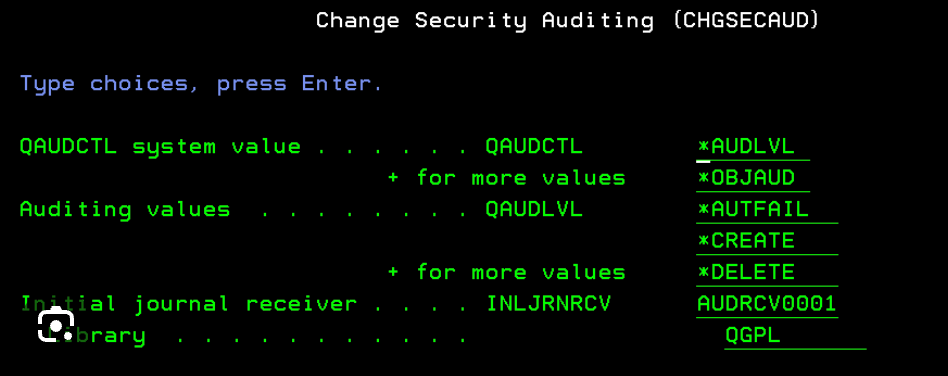
In this blog post, I’ll walk you through IBM i auditing in a straightforward, hands-on way. We’ll cover everything from the basics to setup, monitoring, and reports. Think of this as your go-to resource for IBM i security auditing, packed with tips to make your life easier. Let’s jump in!
Table of Contents
What Is Auditing, Anyway?
You probably audit your finances or your team’s performance, right? System auditing works the same way—it tracks and records activities on your computer systems to spot issues, ensure compliance, and improve security. You log events like logins, file changes, or command executions to review later. This helps you catch unauthorized access, debug problems, or prove to regulators that you’re on top of things. In short, auditing gives you visibility into what happens on your system, so you stay proactive instead of reactive.
Auditing means recording and reviewing system activity so you can answer questions like:
- Who accessed sensitive data?
- Who changed system settings?
- Who signed on, failed to sign on, or used special authority?
- What security-related actions happened on the system?
Auditing does not prevent incidents by itself. Auditing helps you detect, investigate, and prove what happened. In regulated industries—banking, finance, healthcare—auditing is not optional. It is a core security requirement.
What Is IBM i Auditing?
Now, zoom in on IBM i auditing. You use this on IBM i platforms to monitor system events specifically tailored to this robust OS. IBM i auditing logs actions that could impact security, performance, or data integrity. You capture details on user behaviors, object accesses, and system changes. Why bother? It helps you comply with standards like SOX, PCI DSS, or GDPR, and it uncovers vulnerabilities before they bite. IBM i makes this efficient with built-in tools, so you don’t need fancy add-ons right away—though we’ll touch on those later.
IBM i does this using:
- The Security Audit Journal (QAUDJRN)
- System values
- Object-level auditing
- User profile auditing
- Network and access auditing
All audit events go into journal receivers, which you can analyze later.
The key point:
👉 IBM i does not audit everything by default. You must plan and enable it.
Understanding IBM i Security Auditing
IBM i security auditing takes things up a notch by focusing on threats and compliance. You enable it to track security-related events, such as profile changes, authority failures, or network intrusions. At its core, the system uses the Security Audit Journal (QAUDJRN) to store these logs. You control what gets audited through system values like QAUDCTL and QAUDLVL. This isn’t just logging for logging’s sake—you use it to detect anomalies, like a user trying to access restricted files. Set it up right, and you gain peace of mind knowing your system watches its own back.
IBM i security auditing focuses specifically on security-relevant actions, such as:
- User sign-on and sign-off
- Failed password attempts
- Authority failures
- Changes to user profiles
- Changes to system values
- Access to critical objects (files, programs, data areas)
- Use of special authorities (*ALLOBJ, *SECADM, *AUDIT)
Security auditing helps you:
- Detect insider threats
- Investigate security incidents
- Meet compliance requirements (ISO 27001, PCI DSS, SOX, banking regulations)
- Prove that controls actually work
Common IBM i Auditing Issues (And How to Dodge Them)
Nobody’s perfect, and IBM i auditing comes with pitfalls. You might overwhelm your system with too many logs, causing performance slowdowns—I’ve seen journals balloon and eat up disk space in my client’s environments. Or you forget to configure user-specific auditing, missing key activities from power users. Compliance gaps pop up if you don’t align with regulations, leading to failed audits. Virtualization changes can trigger IBM license audits if you don’t track them properly. Outdated OS versions expose vulnerabilities, and poor user profile management lets in risks like over-privileged accounts. To avoid these, start small: Audit only what matters, regularly purge old data, and use tools to automate checks. Trust me, fixing issues early saves you from bigger headaches.
Many IBM i systems technically have auditing enabled—but still fail audits.
Why?
- Auditing Not Enabled at All
- Some systems run for years with QAUDCTL = *NONE.
- Too Much or Too Little Auditing
- Too much → performance impact, huge journals
- Too little → missing critical evidence
- No Monitoring
- Audits run, journals grow, but nobody checks them.
- No Retention or Reporting Strategy
- Audit data exists but gets deleted or overwritten without review.
- No Ownership
- Nobody is clearly responsible for IBM i auditing.
Planning Your IBM i Auditing Strategy
You wouldn’t build a house without a blueprint, so don’t dive into auditing without a plan. First, gather your team—IT admins, compliance officers, and execs—to identify what you need.
Ask:
- What regulations or policies apply to your organization?
- Which events pose the biggest risks?
- Who will review audit reports?
- What to audit?
- Action auditing (like command usage) versus object auditing (like file reads).
- Set goals, like monitoring high-value data or user logins.
- Which objects contain sensitive data?
- Which users have special authority?
- How much is the budget for storage, as journals grow fast.
- How long must audit logs be retained?
- Test in a non-production environment to tweak settings.
A solid plan ensures you audit effectively without bogging down your system.
What Next? Part 2
In Part 2 of this topic, I will discuss,
- IBM i Audit Types (What You Can Audit)
- Key IBM i Auditing Commands
- How to Configure and Enable IBM i Auditing
- How to Monitor IBM i Auditing
- IBM i Audit Reports
- Best Practices for IBM i Auditing