In Part 1 of this topic, I have discussed,
- What Is Auditing, Anyway?
- What Is IBM i Auditing?
- Understanding IBM i Security Auditing
- Common IBM i Auditing Issues (And How to Dodge Them)
- Planning Your IBM i Auditing Strategy
In this section, I will provide a practical guide on how to accomplish this task.
Table of Contents
IBM i Audit Types (What You Can Audit)
IBM i offers flexible audit types to fit your needs. Each serves a different purpose. Here’s a breakdown:
| Audit Type | What it does |
|---|---|
| Security Audit Journal (QAUDJRN) | This is your main hub. Enable it, and you get a chronological record of everything. All security audit entries go into QAUDJRN Stored in journal receivers (QAUDJRNxxx) Controlled by system values Without QAUDJRN, there is no IBM i auditing. |
| System Values | You control auditing via values like QAUDLVL (actions to audit) and QAUDCTL (what’s active, e.g., *AUDLVL for action auditing). Adjust these to fine-tune what the system captures. System values control critical behavior like: Password rules Sign-on limits Security level You can audit: Changes to system values Who changed them When they changed This protects against silent security weakening. |
| Object Audit | Focus on specific objects like files or programs. You track reads, changes, or deletes. Use this for sensitive data—set it per object or user. Object auditing tracks access to specific objects, such as: Database files Programs Data areas You can audit: Read access Change access Delete access Failed access attempts This is essential for sensitive data files. |
| User Audit | Monitor individual users. You log their commands, profile changes, or object interactions. Great for auditing admins or suspicious accounts. User auditing tracks actions by specific users, especially: Users with special authority Service accounts Powerful profiles like QSECOFR clones You can audit: Sign-on attempts Authority failures Profile changes |
| Network Audit | Catch network events, like failed logins or IP address changes. You use this to spot external threats or unauthorized access attempts. Network auditing tracks: FTP access ODBC/JDBC access Remote command execution Exit point activity This is critical because many IBM i breaches happen through network services, not green-screen sign-ons. |
Key IBM i Auditing Commands
Commands make IBM i auditing actionable. Here are the must-haves:
Audit Setup & Configuration
These commands define what events the system should record.
| Command | Purpose |
CHGSECAUD | Change Security Auditing: A “wizard-like” command to set up the auditing environment, including creating the QAUDJRN journal and setting initial system values. |
CHGAUD | Change Auditing Value: Sets the auditing level for a specific object (e.g., *NONE, *ALL, *CHANGE). It determines if actions on that object trigger an audit entry. |
CHGUSRAUD | Change User Audit: Defines which actions a specific user performs should be audited (e.g., auditing all commands run by a powerful profile). |
CHGOBJAUD | Change Object Auditing: Similar to CHGAUD, used to specify if access to a specific object should be logged based on the user’s audit settings. |
WRKSYSVAL | Work with System Values: Used to manage QAUDCTL (Audit Control) and QAUDLVL (Audit Level), which are the “master switches” for system-wide auditing. |
Analysis & Reporting
Once data is collected in the audit journal, these commands help you extract and read it.
| Command | Purpose |
DSPAUDJRNE | Display Audit Journal Entries: Generates reports from the audit journal. You can filter by user, date, or entry type (e.g., AF for authority failures). Note: IBM now recommends using SQL services for more detailed analysis. |
CPYAUDJRNE | Copy Audit Journal Entries: Exports audit data into a database file (out-file). This is standard practice for compliance because it allows you to run Queries or SQL against the data. |
DSPSECAUD | Check your current auditing setup. Displays current information about the security audit journal and the current settings for the system values that control what is being audited on the system. Restriction: You must have audit (*AUDIT) special authority to run this command. |
DSPJRN | Display Journal: The raw way to view entries in QAUDJRN. It is highly flexible but requires knowledge of journal entry codes (like T-AF for Authority Failures). |
PRTADTRPT | Print Audit Report: Used in some environments to print specific formatted reports based on collected audit data. |
Compliance & Vulnerability Assessment
These tools help you check if your current configuration meets security best practices.
| Command | Purpose |
|---|---|
ANZPRFACT | (Analyze Profile Activity): Helps find “stale” user profiles that haven’t signed on in a long time—a key requirement for SOX and PCI compliance. |
ANZUSROBJ | (Analyze User Objects): Identifies objects owned by a user, which is useful when offboarding or auditing “orphaned” objects. |
PRTCMDUSG | (Print Command Usage): Generates a report on how specific commands are being used and by whom. |
PRTPVTAUT | (Print Private Authority): Reports on all users who have specific, private authority to objects, helping you identify “authority creep.” |
Modern Alternative: IBM i Services (SQL)
While the commands above are the traditional method, modern compliance auditing is often done via SQL Table Functions. For example:
SYSTOOLS.AUDIT_JOURNAL_AF: Returns all Authority Failures.SYSTOOLS.AUDIT_JOURNAL_CP: Returns all User Profile Changes.
How to Configure and Enable IBM i Auditing
Configuring auditing on IBM i revolves around the QAUDJRN (Security Audit Journal). While you can set this up manually using multiple commands, the most efficient and recommended way is using the “all-in-one” command: CHGSECAUD.
Here is the step-by-step process to enable and configure auditing.
- Check if auditing runs: Run DSPSECAUD.
- Create the journal: Use CRTJRNRCV and CRTJRN if QAUDJRN doesn’t exist.
- Enable it: Run CHGSECAUD QAUDCTL(*AUDLVL *OBJAUD) to activate action and object auditing.
- Set audit levels: Use WRKSYSVAL QAUDLVL and add values like *SECURITY, *AUTFAIL.
- Audit users and objects: Apply CHGUSRAUD and CHGOBJAUD as needed.
- Test: Perform actions and check QAUDJRN for entries.
Use SECTOOLS menu for a guided setup—it’s a lifesaver for beginners.
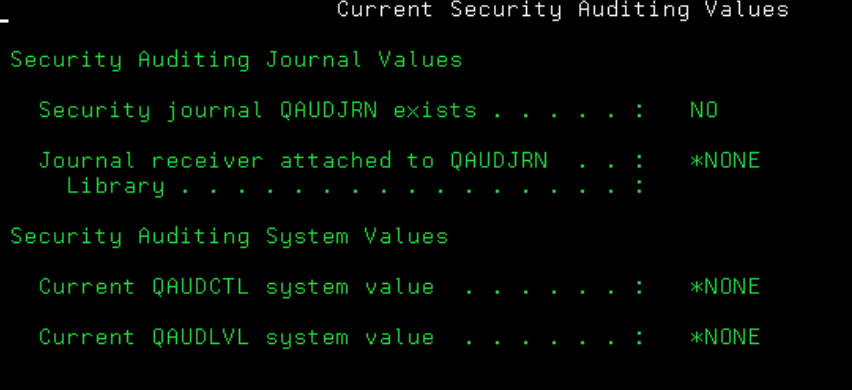
Step 1: Run DSPSECAUD.
This command displays current information about the security audit journal and the current settings for the system values that control what is being audited on the system.
Step 2: Automated Setup with CHGSECAUD
The CHGSECAUD (Change Security Auditing) command is a shortcut. If the QAUDJRN doesn’t exist, this command creates it, creates a journal receiver, and sets the critical system values all at once. Run this command (requires *ALLOBJ and *AUDIT authority)
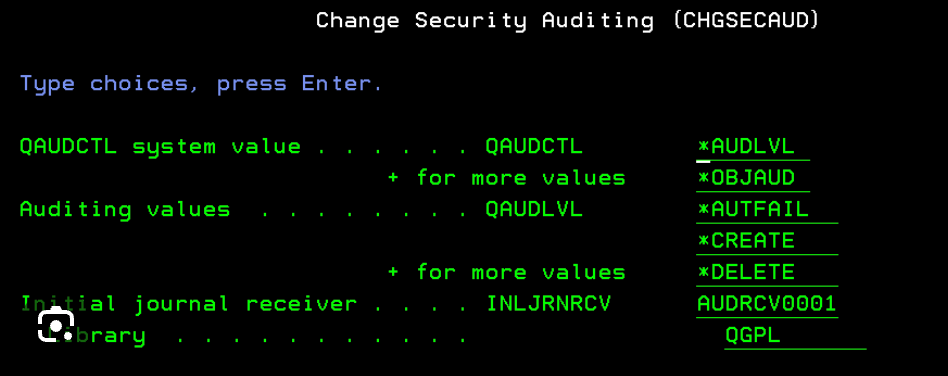
CHGSECAUD QAUDCTL(*AUDLVL *OBJAUD NOQTEMP) QAUDLVL(AUTFAIL *SECURITY *SERVICE *DELETE *PGMFAIL) INLJRNRCV(QGPL/AUDRCV0001)
What this command does:
- Creates
QAUDJRNin libraryQSYS, if it is not already created. - Creates Receiver
AUDRCV0001inQGPL(you can change the library to a dedicated audit library like JRNLIB). - Sets
QAUDCTL(Audit Control):*AUDLVL: Enables auditing based on levels.*OBJAUD: Enables specific object auditing.*NOQTEMP: Prevents bloating logs with temporary session data.
- Sets
QAUDLVL(Audit Level): This defines what is logged (e.g., authority failures, security-sensitive changes).
Step 3: Configure System Behavior (System Values)
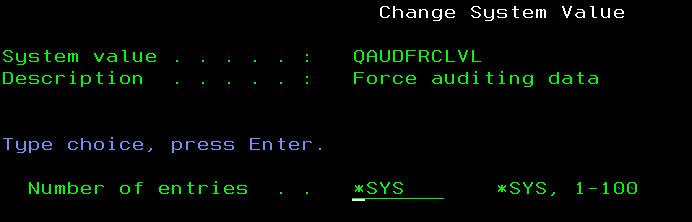
After the initial setup, check these two system values via WRKSYSVAL to ensure the system handles audit logs correctly:
QAUDFRCLVL(Force Level): Set this to a number (e.g.,100) to force the system to write audit records from memory to disk after X entries. This prevents data loss during a crash.
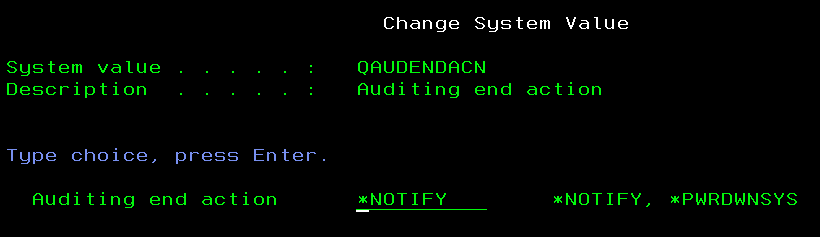
QAUDENDACN(End Action): Defines what the system does if it cannot write to the audit journal (e.g., disk is full).*NOTIFY: Sends a message to the system operator (Standard).*PWRDWNSYS: Powers down the system immediately (High Security).
Step 4: Enable Object-Level Auditing
Even if auditing is “on,” the system won’t track access to specific files unless you tell it which ones are sensitive.
- To audit a specific file:
CHGOBJAUD OBJ(MYLIB/SENSITIVE_FILE) OBJTYPE(*FILE) OBJAUD(*ALL) - Common values for
OBJAUD:*ALL: Records every time someone reads or changes the object.*CHANGE: Only records when the data is modified.*NONE: Turns off auditing for this specific object.
Step 5: Enable User-Level Auditing
If you want to watch a specific high-risk user (e.g., a contractor or someone with *ALLOBJ), use CHGUSRAUD.
- To audit every command a specific user runs:
CHGUSRAUD USRPRF(USERNAME) AUDLVL(*CMD)
Step 6: Verify the Setup
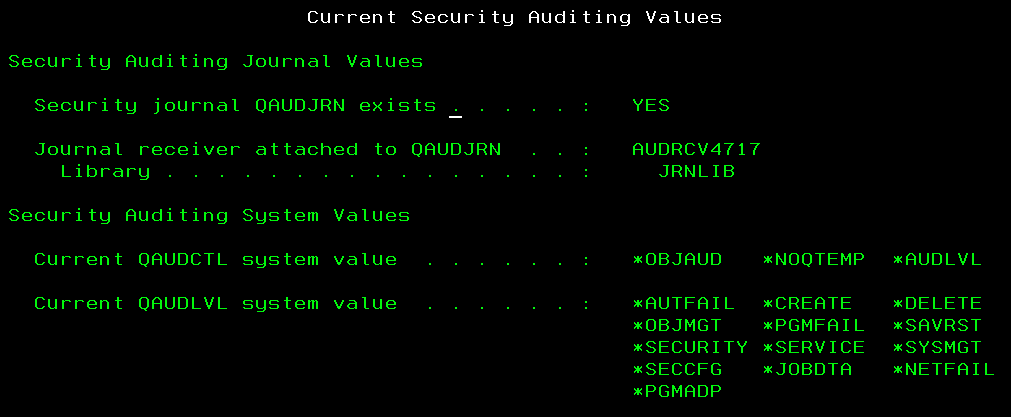
To confirm auditing is active and see what is currently being tracked, use: DSPSECAUD.
This displays a summary of your current QAUDCTL and QAUDLVL settings and confirms that the journal is active.
Important Maintenance Tip
Audit journals can grow very large and consume disk space quickly.
- Use System-Managed Receivers: When you create the journal (or via
CHGJRN), ensureMNGRCV(*SYSTEM)is set so the system automatically creates new “books” (receivers) when one gets full. - Cleanup: Set up a background job to save and delete old journal receivers (e.g., those older than 30 or 60 days) to prevent a “Disk Full” error.
How to Monitor IBM i Audits Effectively
Monitoring keeps you in the loop. You review QAUDJRN regularly with DSPJRN or DSPAUDJRNE.
Modern IBM i administration has shifted away from manual command-line scrolling to Automation and SQL.
- Real-Time Alerting (Message Queues) – The system sends alerts to the QSYSOPR or QSYSMSG message queues for critical audit events.
- Monitor for
CPF7062: This indicates the audit journal is almost full. - Monitor for
CPW1535: This indicates a security violation (e.g., too many incorrect sign-on attempts).
- Monitor for
- Use System-Managed Journaling – Don’t manage journal receivers manually. Set the journal to
MNGRCV(*SYSTEM)andDLTRCV(*YES)(after ensuring they are backed up). This ensures auditing never stops due to a “disk full” condition. - Generating Audit Reports (The “Old” Way) – If you need a quick text-based report, use the
DSPAUDJRNEcommand. It parses the raw journal data into a readable format.- To see all Authority Failures (AF) for today:
DSPAUDJRNE ENTTYP(AF) PERIOD((*AVAIL *BEGIN)) OUTPUT(*)
- To see all Profile Changes (CP) (e.g., someone getting ALLOBJ):
DSPAUDJRNE ENTTYP(CP) OUTPUT(*PRINT)
- To see all Authority Failures (AF) for today:
Analyzing Reports (The “New” Way via SQL)
IBM i Services (SQL) are now the gold standard for compliance. SQL allows you to join audit data with user information to find exactly who did what.
- Ex: Determine the number of “Not authorized to object” authority failures for user SAMEERA in the last week
SELECT COUNT(*)
FROM TABLE(
  SYSTOOLS.AUDIT_JOURNAL_AF(
    STARTING_TIMESTAMP => CURRENT TIMESTAMP - 7 DAYS,
    USER_NAME => 'SAMEERA'
  )
)
WHERE VIOLATION_TYPE = 'A';- Find all User Profile Changes in the last 7 days
SELECT *
FROM TABLE(
  SYSTOOLS.AUDIT_JOURNAL_CP(
    STARTING_TIMESTAMP => CURRENT TIMESTAMP - 7 DAYS
  )
);
Key Audit Entry Types to Track
When generating reports, focus on these specific Journal Entry Types:
| Entry Type | Description | Why it matters for Compliance |
| AF | Authority Failure | Detects unauthorized access or hacking attempts. |
| CP | User Profile Change | Tracks when someone gains higher privileges. |
| CD | Command Run | Provides a “paper trail” of what admins did. |
| PW | Password Invalid | Identifies brute-force login attacks. |
| SV | System Value Change | Tracks changes to global security settings. |
| OR | Object Restored | Detects if an old (possibly insecure) file was restored. |
You can generate reports using:
- SQL queries on journal receivers
- IBM i Navigator
- Third-party security tools
- Custom scripts
Automation Strategy
For true compliance (like SOX, HIPAA, or PCI-DSS), you should:
- Schedule a Nightly Job: Use the
CPYAUDJRNEcommand or an SQL script to export the last 24 hours of data into a “Security History” file. - Exception Reporting: Create a report that only shows Authority Failures (
AF) and System Value changes (SV). - Review Signature: Keep a log of when these reports were reviewed by a security officer.
For real-time alerts, integrate with SIEM tools—activate journaling and specify users to monitor. Third-party solutions like Fortra’s Powertech Complaince Monitor for IBMI i/Powertech SIEM Agent for IBM i or Precisely’s Assure Monitoring and Reporting automate this.
Best Practices for IBM i Auditing
- Audit what matters, not everything
- Monitor audit logs daily or weekly
- Protect audit journal receivers
- Retain logs based on compliance needs
- Review special authority usage regularly
- Test auditing after system changes
- IBM i Security Audit Journal & Entry Types IBM i Security Auditing Journal Entries (IBM Docs)
- Object Auditing Operations IBM i Object Operations and Auditing (IBM Docs)
- QAUDJRN—IBM i Security Audit Journal QAUDJRN Explained (HelpSystems/Powertech)
- What QAUDJRN Doesn’t Collect (Challenges) QAUDJRN: What It Doesn’t Collect (Seasoft)
- Auditing Privileged Users and Sensitive Files IBM i Security: Auditing Privileged Users & Data Files (Townsend Security)
- Object Auditing Details Tracking Access to Sensitive Files (SecureMyi)
- End-to-End Audit Setup IBM i Audit Configuration (Micro Focus/NetIQ)