IBM i security discussions usually focus on special authorities, exit programs, and object-level permissions. Very few discussions go deep into object ownership chains, even though they can silently bypass carefully designed authority models.
Ownership chains exist by design. They simplify application execution. But in real environments—especially legacy-heavy systems—they create unintended privilege escalation paths that remain invisible to audits and daily operations.
This post explains how ownership chains work, why they are dangerous, how attackers exploit them, and how to detect and control them using native IBM i commands.
This is not theory. These risks exist in production systems today.
Table of Contents
What Is an Object Ownership Chain ?
On IBM i, every object has:
- An owner
- An authority structure
- Optional adopted authority behavior
When a program runs, IBM i evaluates authority in this order:
- User profile authority
- Group profile authority
- Adopted authority (program owner or *USEADPAUT)
- Object owner authority
If a program adopts authority, IBM i temporarily adds the owner’s authority to the job only while that program runs.
That temporary authority can:
- Access files the user cannot
- Run commands the user cannot
- Call other programs with elevated privilege
This is the core of an ownership chain.
These chains can create unintended pathways for privilege escalation, allowing low-privileged users to gain elevated access through a series of ownership links that bypass traditional object-level security.
Unlike straightforward authority grants, ownership chains operate quietly, leveraging the system’s adopted authority mechanism to propagate rights in ways that aren’t immediately obvious. This makes them a hidden risk that’s rarely covered in depth—most resources focus on direct authorities, leaving these chains as an overlooked vulnerability in many environments.
How Adopted Authority Really Works
To understand the risk, we have to look at Adopted Authority. In a standard setup, a program runs with the authority of the user who called it. However, IBM i allows a program to “adopt” the authority of its Owner.
At its core, adopted authority is a feature designed to let programs temporarily “adopt” the privileges of their owner, enabling users to perform tasks they wouldn’t otherwise have the rights to do. This is controlled by the USRPRF(*OWNER) parameter on program objects. When a program runs, it adds the owner’s authorities to the user’s existing ones, but only while the program is active in the call stack. Once it exits, those adopted rights vanish.
Objects That Can Adopt Authority
- Programs (*PGM): Specifically ILE or OPM programs.
- Service Programs (*SRVPGM): ILE service programs can adopt authority.
- SQL Packages (*SQLPKG): These can also adopt owner authority.
Let me explain this further.
- When a program uses the owner’s authority, it’s referred to as adopted authority.
- When you create a program, you specify a user profile (USRPRF) parameter on the
CRTxxxPGMcommand (CRTCLPGM, CRTCBLPGM, CRTRPGPGM, etc) . - This parameter indicates whether the program utilizes the authority of the program’s owner in addition to the authority of the user executing the program.
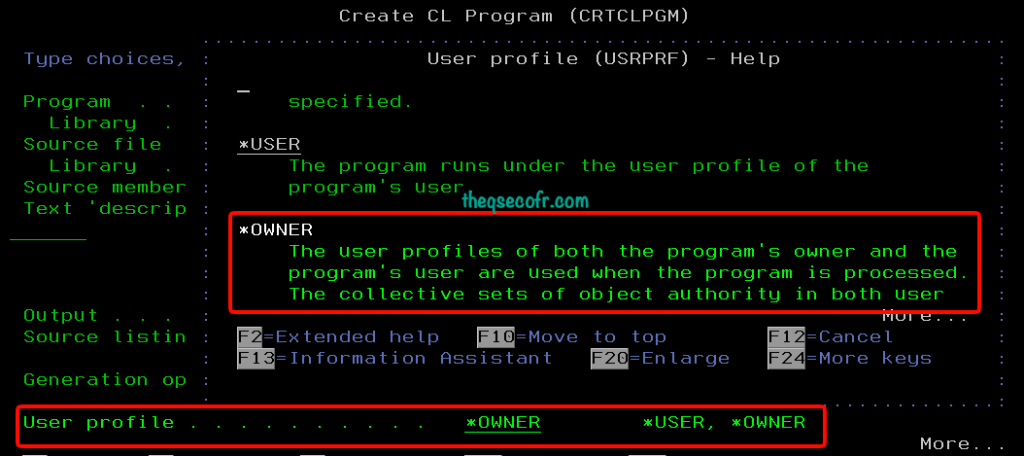
- Any other authority found for the user is append by the adopted authority.
- It is checked only if the user lacks the necessary authority to perform the requested operation on an object.
- The special authorities (such as
*ALLOBJ, *IOSYSCFG ,..) in the owner’s profile are used. - The owner’s group authority or Public authority is not used for adopted authority.
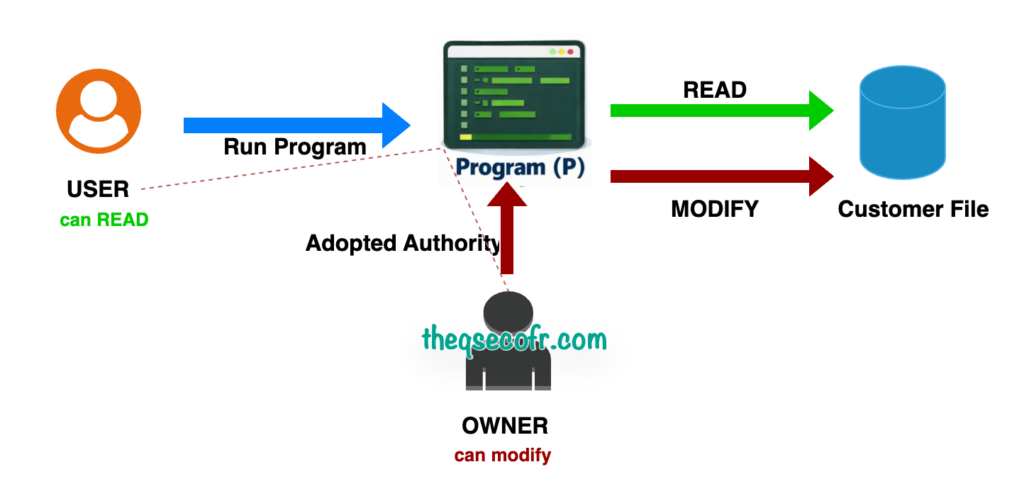
For example, The system checks authorities in a stack: user rights first, then group rights, then adopted ones from the call stack. Public authorities are ignored for adoption, ensuring it’s strictly owner-based. if a user runs a program that requires *USE authority to a customer file, adopted authority allows the program to use the owner’s authority to modify the file while querying it with SQL.
| Program Details | Object Ownership | Authorities | Result |
|---|---|---|---|
PGM | Program GETSAL → Owned by APPOWNER File CUSTMPF → Owned by APPOWNER | USER→ *USE authority to GETSAL USER → *EXCLUDE authority to CUSTMPF | USER01 can run GETSAL and read/modify CUSTMPF.No special authority. No direct file access. No audit warning. |
Common real-world mistake
- APPOWNER has:
- *ALLOBJ
- *SECADM
- *JOBCTL
Any program owned by APPOWNER becomes a privilege bridge.
This mechanism is powerful for applications needing controlled access, like a payroll system where a clerk can view sensitive data only through a specific report program. However, if not implemented carefully, it can lead to escalation. Privileged scripts or programs that adopt authority without proper safeguards—such as monitoring the call stack or using features like Modify Invocation Authority Attributes (MODINVAU) to block further adoption—create risks. The authority remains active as long as the adopting program is in the stack, potentially allowing chained exploits if multiple programs are involved.
The Hidden Risk: If a powerful profile (like QSECOFR or a custom application owner with *ALLOBJ) owns a program that can be subverted or modified by a lower-level user, that user effectively inherits the keys to the kingdom.
Ownership Chain vs Adopted Authority
Ownership chains often get confused with adopted authority. They are related but not identical.
| Concept | Description |
|---|---|
| Adopted authority | Program explicitly adopts owner’s authority |
| Ownership chain | Multiple objects owned by the same profile allow access without explicit authority |
Key point:
A user may access a restricted object without any direct authority if the ownership chain remains intact.
Why? Ownership chain. IBM i trusts the owner of the program and the file.
Why This Becomes a Privilege Escalation Risk
Ownership chains become dangerous when:
- Program owners have powerful special authorities
- Files contain sensitive business data
- Programs execute dynamic commands
- Object ownership gets reused across libraries
Real-World Misuse Scenarios
The “CALL PGM(QCMD)” Disaster Pattern
An administrator creates a utility program to help users perform a specific task. To make it work, the program is owned by a high-privilege profile and set to USRPRF(*OWNER). If that program has an “exit to command line” feature or allows a user to run a generic command (like QCMDEXC), the user can now execute any command with the owner’s full authority.
If this program:
- Adopts authority
- Is owned by a powerful profile
Then the user gets a command line with adopted authority. This is not theoretical. This is one of the oldest IBM i escalation paths.
Another example, If a privileged program adopts authority but doesn’t sanitize inputs or control the execution flow, an attacker can chain calls to gain root-like access. For example, SQL services flaws have allowed authenticated users to execute procedures under another profile’s privileges, chaining to OS root access. These aren’t hypothetical—reports from ethical hackers show how improper implementation of adopted authority in privileged scripts leads to full system compromise.
The Developmental “Trojan Horse”
In many shops, developers own the objects in a test library. If a developer creates a program, sets it to adopt authority, and then a systems administrator moves that program into production without changing the owner to a restricted profile, the developer (or anyone who can modify that developer’s test objects) has created a back door into the production environment.
Hidden Ownership Chains Across Libraries
Ownership chains do not stop at one object.
- Example chain:
- Program A (LIB1) → Program B (LIB2) → File C (LIB3)
If:
All objects share the same owner
Program A adopts authority
- Program A (LIB1) → Program B (LIB2) → File C (LIB3)
- Then authority flows across libraries.
- This bypasses:
- Library-level security
- Object-level permissions
- Menu restrictions
Remote commands
In another real-world case, remote commands from external sources like Windows CMD or DB2 Connect can create profiles with special authorities, owned by unexpected users. This bypasses authentication (CVE-2023-30990) and creates ownership chains where the new profile inherits elevated rights, enabling further escalation. Vulnerable systems often end up with multiple privately authorized profiles that chain together, allowing low-priv users to “hijack” higher ones.
Library List
One common scenario involves library list (LIBL) abuse (CVE-2025-36004): attackers manipulate the library search path to inject malicious objects owned by privileged profiles, leading to privilege escalation. Even with profile swapping mitigations in place, LIBL vulnerabilities can still allow an attacker to chain ownerships for unauthorized access.
Why Audits Miss This
Traditional audits focus on User Profiles and Object Private Authorities. An auditor might look at a sensitive payroll file and see that only three people have access. They check the box and move on.
The Blind Spot: They aren’t looking at the Ownership Chain of the programs that touch that file.
- They miss programs that adopt authority.
- They don’t check for “chained” ownership where Program A calls Program B, both adopting different levels of authority. Call stack authority flow
- They rarely audit the
CHGPGM(Change Program) orCRTXXXPGMcommands to see who has the right to create objects that adopt authority.
In essence, without probing ownership hierarchies and adoption flows, auditors see only the tip of the iceberg.
Ownership chains do not appear in:
- WRKUSRPRF
- DSPAUT summaries
- Standard compliance reports
Practical Ways to Detect Risky Ownership Chains
Securing your system requires moving beyond simple authority checks. You need to map the relationship between owners and programs. Detecting these chains requires proactive tools and practices.
Start with the Audit Journal: Enable auditing for ownership changes and use SQL queries to analyze entries, identifying unauthorized shifts and reverting them if needed.
Step 1: Find Programs That Adopt Authority and Check Program Owners
- Find Programs That Adopt Authority –
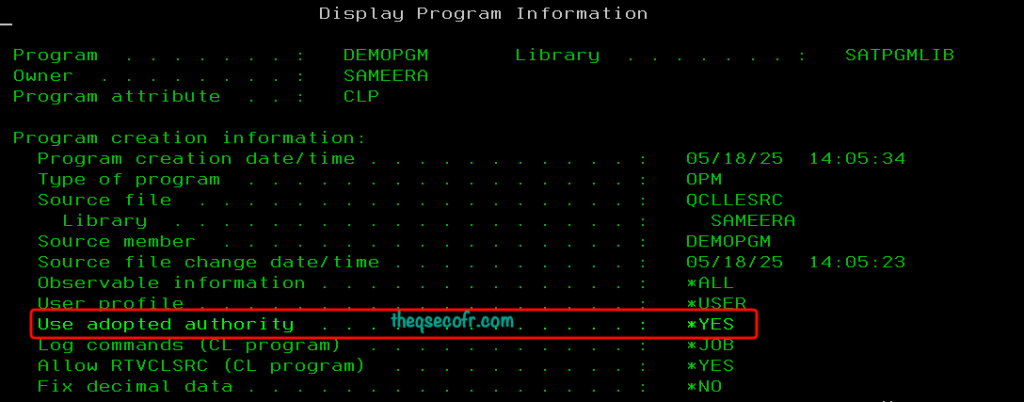
DSPPGM PGM(MYLIB/*ALL) DETAIL(*BASIC)- Look for:
- User profile . . . . . . . . . . . . : *OWNER
Use adopted authority . . . . . : *YES- Focus on: Owner . . . . . . . . . . . . . : APPOWNER
- Look for:

- Audit the
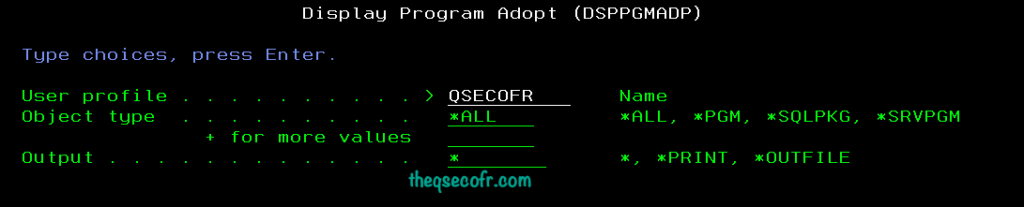
USRPRF(*OWNER)Attribute – Your first step is identifying every program on the system that adopts authority. You can use theDSPPGMADP(Display Program Adopt) command or query the system metadata:-- SQL to find programs that adopt owner authority
SELECT * FROM QSYS2.PROGRAM_INFO
WHERE USER_PROFILE = '*OWNER'
AND USE_ADOPTED_AUTHORITY ='*YES';
Step 2: Check Owner’s Special Authorities
- Check for “Powerful” Owners – Once you have the list, filter for programs owned by profiles with special authorities like
*ALLOBJ, *SECADM, or *SERVICE. These are your highest-risk objects. - List All Objects Owned by Powerful Owners.
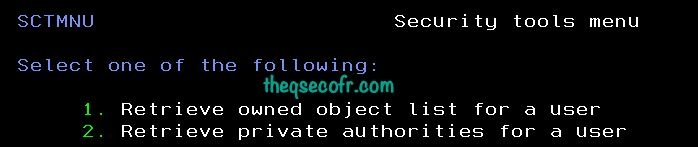
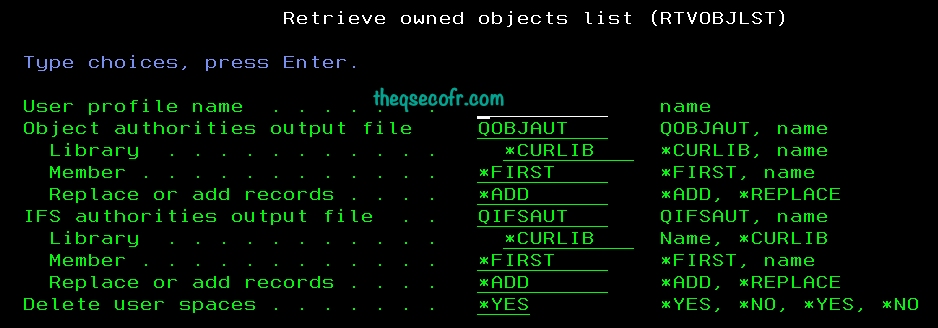
- GO SPTMNU Option 1 or Retrieve owned object list (RTVOBJLST)
- The Support Tools Menu (GO SPTMNU) now has an Option 1. Retrieve owned object list for a user
- Security tools menu (SCTMNU) which provides the above option can be obtained by using the GO MG menu –> Option 22 –> Option 7 in the QMGTOOLS library.
- GO SPTMNU Option 1 or Retrieve owned object list (RTVOBJLST)
Step 3: Identify Files Accessed by Adopted Programs
- Use DSPPGMREF:
DSPPGMREF PGM(MYLIB/GETSAL)
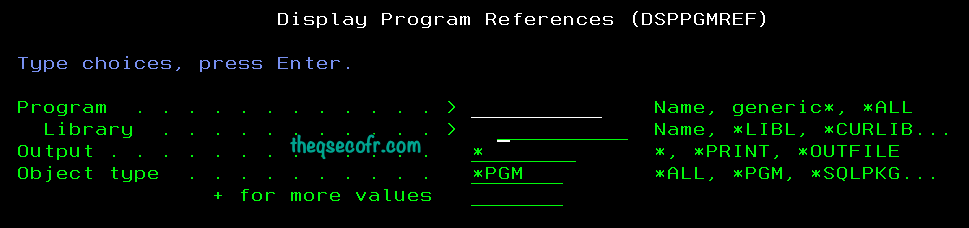
- This reveals a list of the system objects referred to by the specified programs can output the data to a file (
OUTFILE) for easier analysis.. The following list shows the system objects provided for the respective program types such as CLP, CLE, CLLE, QRYDFN, RPGLE, etc. - Cross-check ownership of every referenced object.
Step 4: Detecting Cross-Library Ownership Abuse
- Run:
DSPOBJD OBJ(MYLIB/*ALL) OBJTYPE(*PGM) - Then compare owners with:
DSPOBJD OBJ(OTHERLIB/*ALL) OBJTYPE(*FILE) - If the same owner appears everywhere, you have an ownership monoculture—a serious risk.
Step 5: Monitor File Access
- For runtime analysis, use native commands or tools that track file usage within a call stack where adoption is active.
- Sign on as that user and issue a DSPJOB or WRKACTJOB command. Find the job in question, type 5 next to it, and press the Enter key.
- Ex: Write down the programs in the stack below. Starting at the bottom, issue a DSPPGM command on each program.
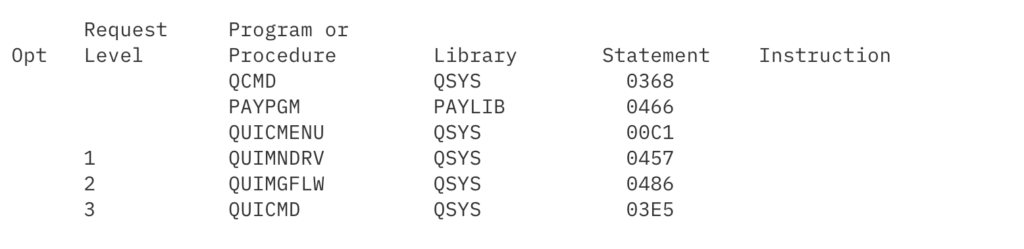
- In this example, which is based on numerous actual cases, assume that QUICMD, QUIMGFLW, QUIMNDRV, and QUICMENU all have USEADPAUT(*YES), while PAYPGM has USRPRF(*OWNER). The owner of PAYPGM was QSECOFR. QSECOFR’s authority flows down the stack giving the user the same All Object authority as QSECOFR has. This enabled the user to touch any object in the system.
Step 6: Monitor the “Change” History
- Use the audit journal (
QAUDJRN) to look specific entries on programs that adopt authority. If a program adoptsQSECOFRauthority and was recently changed by a non-security user, that is a massive red flag. - You can query the audit journal to find out who accessed or changed a objects.
DSPJRN JRN(QSYS/QAUDJRN) RCVRNG(*CURCHAIN) ENTTYP(XX) OUTPUT(*OUTFILE) OUTFILFMT(*TYPE5) OUTFILE(QTEMP/OBJAUDIT)- Example entry types:
AF,AP,PA,DO,PG,PS, etc.
- Example entry types:
- Analyze with SQL: Use “Run SQL Scripts” in ACS to query the resulting
QTEMP/file to identify users, timestamps, and files accessed.OBJAUDIT
Step 7: Review IFS for Accessed Files
- If the IFS auditing is active, you can query the audit journal to find out who accessed or changed a file.
Note: Adopted authority is not supported by the Integrated File System.
- Note: Adopted authority is not supported by the Integrated File System.
- Dump Audit Data to a File: Use
DSPJRNto output data to a file for analysis.- As an explample; T:ZC (Change to Object) journal entries
- DSPJRN JRN(QSYS/QAUDJRN) RCVRNG(CURCHAIN) JRNCDE((T)) ENTTYP(ZC) OUTPUT(OUTFILE) OUTFILFMT(TYPE5) OUTFILE(QTEMP/IFSAUDIT) ENTDTALEN(VARLEN 16000 100)
- As an explample; T:ZC (Change to Object) journal entries
- Analyze with SQL: Use “Run SQL Scripts” in ACS to query the resulting
QTEMP/IFSAUDITfile to identify users, timestamps, and files accessed. - Review IFS Activities via ACS or Navigator
- For a live, graphical view of the IFS structure:
- Access Client Solutions (ACS): Open the Integrated File System plug-in from the main menu. You can browse, drag-and-drop, and view properties of files.
- Navigator for i (Web): Navigate to File Systems > Integrated File System to see directories and files.
- For a live, graphical view of the IFS structure:
How to Break Dangerous Ownership Chains (Safely)
Strategy 1: Separate Owners by Function
- Create a dedicated owner profile: Create a new, non-interactive user profile with minimal authorities (e.g., no *ALLOBJ special authority and no command line access) to act as the owner of the application’s objects.
- Application programs →
APP_PGM_OWN - Data files →
APP_DATA_OWN - System utilities →
SYS_OWN
- Application programs →
- Never reuse powerful profiles
- Transfer ownership:
- Use the Change Object Owner (CHGOBJOWN) ,Change Owner (CHGOWN) commands to transfer ownership of the objects from the current owner (e.g., QSECOFR) to the new, restricted owner profile.
- Safely transfer authority: The default for the
CUROWNAUTparameter is*REVOKE, which automatically removes the previous owner’s authority to the object. Ensure this parameter is used to prevent the former owner from retaining unnecessary access.
- Safely transfer authority: The default for the
- Use Change Program (CHGPGM) and/or Change Service Program (CHGSRVPGM) commands to change the owners.
- Use the Change Object Owner (CHGOBJOWN) ,Change Owner (CHGOWN) commands to transfer ownership of the objects from the current owner (e.g., QSECOFR) to the new, restricted owner profile.
Strategy 2: Minimize adopted authority
If a program truly needs elevated access: Grant object-level authority, Avoid blanket special authorities
- Minimize adopted authority:
- Set programs to run with the caller’s authority (
USRPRF(*USER)) whenever possible. - If adoption is necessary for specific, narrowly defined business justifications, ensure strong access controls (e.g., authorization lists) are in place to restrict who can execute the program.
- Set programs to run with the caller’s authority (
- Implement authorization lists and PUBLIC EXCLUDE: Apply authorization lists to sensitive program objects and set *PUBLIC authority to *EXCLUDE. This blocks unauthorized execution paths and ensures only specific, authorized users or groups have access.
Strategy 3: Eliminate Dynamic Command Execution
Avoid: CALL QCMD
use:
- Parameterized CL
- Controlled APIs
Fully qualify calls: Ensure all sensitive calls to programs, commands, and files are fully qualified with their library names (never rely solely on *LIBL). This prevents library list manipulation, a common vector for privilege escalation attacks.
Strategy 4: Monitor Adopted Authority Usage
Regularly audit object ownership and permissions to ensure compliance with the new security template and check for any deviations. Commercial tools can help in comparing current settings against a predefined security template.
Enable auditing above options and Then correlate:
- User
- Program
- Owner
- Object accessed
Ownership Chains vs Zero Trust Thinking
Ownership chains assume:
“If you trust the program owner, you trust everything it touches.”
That assumption no longer holds in:
- Shared environments
- Multi-team operations
- Compliance-driven systems
IBM i does not enforce Zero Trust. You must design it.
Final Thoughts
Object ownership isn’t just about who “owns” a file; it’s about the invisible permissions that flow through your application stack. Ownership chains are not a vulnerability. They are a powerful feature. But unmanaged ownership chains turn IBM i into:
- A privilege escalation platform
- A blind spot for audits
- A nightmare during forensic investigations
If you secure IBM i seriously, you must understand who owns what—and why. By auditing your ownership chains and strictly controlling who can create programs that adopt authority, you close a loophole that many hackers—and even some auditors—rely on staying open.
Here are relevant, credible references to support the key points in the blog post on IBM i Object Ownership Chains: A Hidden Privilege Escalation Risk. I’ve grouped them by the main sections for easy mapping, with direct links and brief descriptions of how they relate.
How Adopted Authority Really Works Under the Hood
- IBM Official Documentation: Adopted Authority https://www.ibm.com/support/pages/adopted-authority
- IBM i Security Reference https://www.ibm.com/docs/en/ssw_ibm_i_74/rzarl/sc415302.pdf
- IBM i: Use Adopted Authority System Value (QUSEADPAUT) https://www.ibm.com/docs/en/i/7.4?topic=values-use-adopted-authority-quseadpaut
- Silent Signal Techblog: Abusing Adopted Authority on IBM i https://blog.silentsignal.eu/2023/01/20/abusing-adopted-authority-on-ibm-i
- Silent Signal Techblog: IBM i LIBL Autopwn – Kill the Vulnerability Class (2025) https://blog.silentsignal.eu/2025/10/22/IBM-i-LIBL-Autopwn-Kill-the-Vulnerability-Class
- IBM Security Bulletin: Privilege Escalation in IBM i SQL Services (CVE-2025-36367) https://www.ibm.com/support/pages/security-bulletin-ibm-i-affected-privilege-escalation-ibm-i-sql-services-cve-2025-36367
- LinkedIn Article: IBM i Security Vulnerable to Privilege Escalation https://www.linkedin.com/pulse/your-ibm-i-iseriesas400-security-vulnerable-privilege-bob-losey
- Precisely: Best Practices for Managing Elevated IBM i Authorities (Part 2) https://www.precisely.com/data-security/best-practices-managing-elevated-ibm-i-authorities-part-2
- Fortra: How IBM i Determines a User’s Authority to Access Objects https://www.fortra.com/blog/how-ibm-i-determines-user-authority-access-objects
- IT Jungle: Guru – IBM i Privileged Account Management https://www.itjungle.com/2022/08/01/guru-ibm-i-privileged-account-management-and-whats-so-special-about-special-authorities
- IBM i Documentation: Object Ownership https://www.ibm.com/docs/en/i/7.5.0?topic=security-object-ownership