The IBM i community recently welcomed a new member to its open-source family: Mapepire. Named after a South American pit viper (pronounced MAH-pup-ee), this tool isn’t something to fear. In fact, it’s a venomous strike against the legacy headaches often associated with database connectivity. It addresses the complexities of traditional ODBC and JDBC drivers, offering a streamlined, secure, and cloud-friendly alternative.

In this post, we’ll explore what Mapepire is, why it exists, and how you can get started with it today.
Table of Contents
What is Mapepire?
Mapepire is a modern database access layer built on top of Secure WebSockets. It serves as a bridge between modern application languages (like Node.js, Python, and Java with more coming, like potential support for .NET Core, PHP, and Go) and the Db2 for i database. Unlike traditional drivers, Mapepire moves the heavy lifting from the client to the server, providing a lightweight, fast, and highly portable way to interact with IBM i data.
The Mapepire server handles SQL execution natively on IBM i while clients send requests over a single encrypted port (default 8076). This architecture eliminates native driver dependencies on the client side and simplifies deployment in cloud-native and containerized environments.
Why was it developed?
IBM and contributors created Mapepire to overcome persistent pain points with traditional Db2 for i access methods. Existing ODBC drivers and the JDBC/JTOpen toolbox carry heavy complexity.Tx
- Complexity: Traditional drivers are “heavy.” They handle CCSID conversions, complex encodings, and password levels on the client side, making them difficult to bundle into lightweight containers.
- Native Dependencies: Setting up ODBC often requires installing specific binaries on the client machine, which complicates CI/CD pipelines and cloud deployments.
- Closed Protocols: The communication protocols for JTOpen and ODBC are not always easy to work with or publicly documented for modern language implementation.
These issues inflate client size, complicate maintenance, hinder cloud/container deployments and slow innovation.
Mapepire shifts that complexity to the server side. Developers gain a lighter, “almost dumber” client that focuses purely on sending queries and receiving results. The project delivers a consistent SDK across languages, supports deployment anywhere (Red Hat UBI, Alpine containers, IBM Cloud, WatsonX.ai, Vercel, AWS, Azure), uses a single port with always-encrypted traffic, minimizes dependencies, and enables faster updates through package managers (npm, PyPI, Maven).
Its primary purpose centers on empowering developers to build and deploy modern, cloud-native applications that access Db2 for i more easily, securely, and efficiently—without the baggage of legacy drivers.
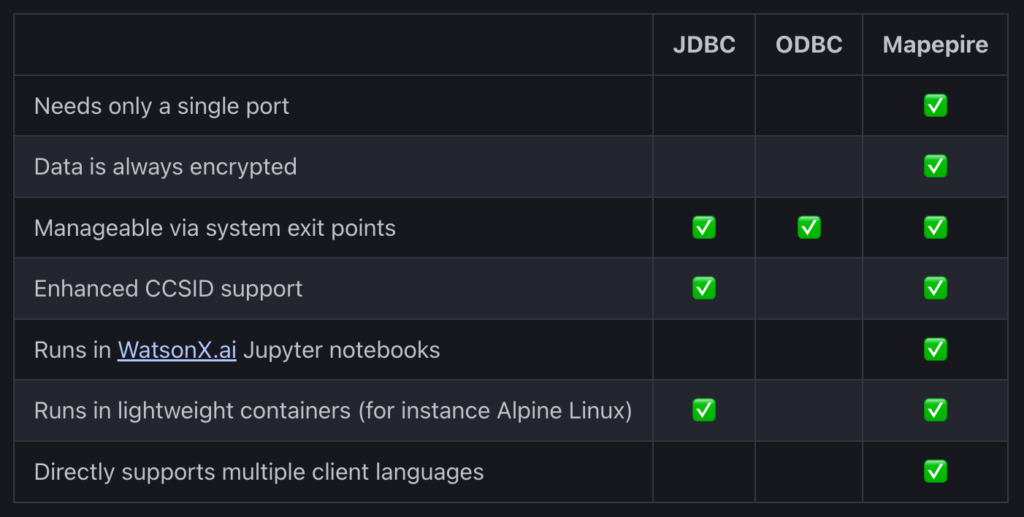
IBM developed Mapepire to solve these “modern-day” problems, creating a driver that is container-ready and developer-friendly.
The Core Purpose and Benefits
Mapepire’s primary goal is to make IBM i data accessible anywhere. Whether you are running a microservice in an Alpine Linux container, a Jupyter notebook in WatsonX.ai, or a serverless function on AWS or Azure, Mapepire fits right in.
Key Benefits:
- Zero Client Dependencies: You don’t need to install native drivers or IBM i Access Client Solutions (ACS) on your local machine or container.
- Single Port Communication: It communicates over a single port (default 8076), making firewall configuration a breeze compared to the “port soup” required by traditional DDM/DRDA connections.
- Encryption by Default: All data moving across the wire is encrypted via WebSockets.
- Speed: Benchmarks show Mapepire often outperforms ODBC in Node.js environments due to its streamlined architecture.
How to Install and Configure Mapepire on IBM i
Mapepire consists of two parts: the Server (running on IBM i) and the Client (running wherever your app is).
Install the Server
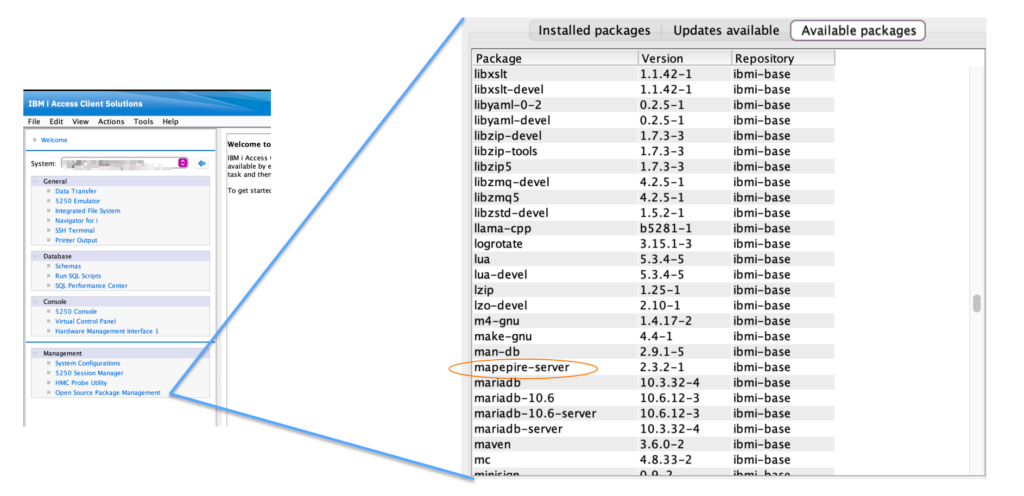
The easiest way to install the server is via Yum (Open Source Package Management). Open your SSH terminal and run:
yum update
yum list mapepire-server
yum install mapepire-server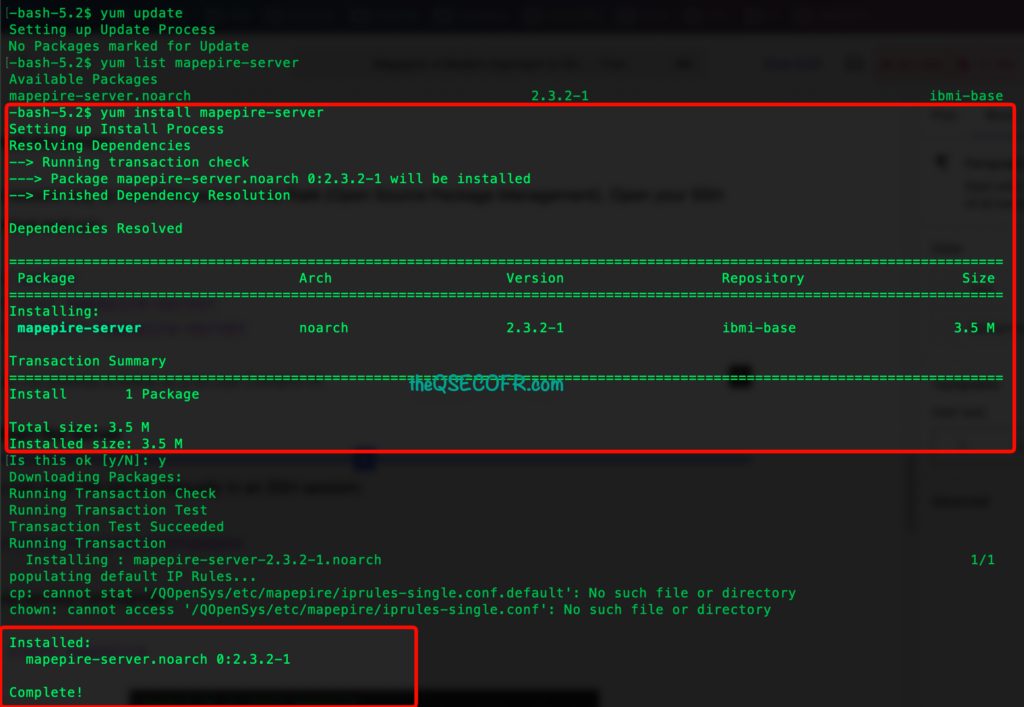
Using Open Source Package Management from ACS
Start the Server
You can start the server manually in an SSH session:
bash /QOpenSys/pkgs/bin/mapepire or via service commander
sc start mapepire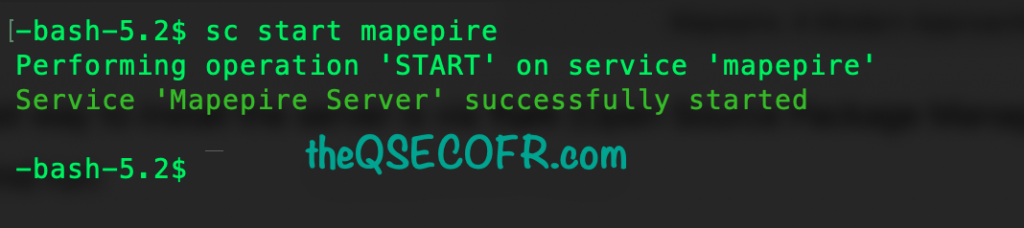
However, for production, you should submit it as a background job:
SBMJOB CMD(QSH CMD('/QOpenSys/pkgs/bin/mapepire')) JOB(MAPEPIRE) JOBQ(QUSRNOMAX)Note: The server defaults to port 8076. You can change this by setting the PORT environment variable before starting.
scedit mapepire
How to Use Mapepire
Once the server runs, you can use one of the language-specific SDKs. Let’s look at a Python example.
1. Install the Client SDK
pip install mapepire-python2. Run a Query
import mapepire
from mapepire_python.client.sql_job import SQLJob

#Define connection details

creds = {
   "host": "your_ibm_i_ip",
   "port": 8076,
   "user": "SAMEERA",
   "password": "MYPASSWORD",
   "ignoreunauthorized": True # Use for self-signed certs
}

#Execute a query

with SQLJob(creds) as sql_job:
 with sql_job.query("SELECT * FROM SAMEERA.QCUSTCDT") as query:
 result = query.run(rows_to_fetch=10)
 print(result)
3. Or Configure connection details in mapepire.ini:
[mapepire]
host=your_ibm_i_host
port=8076
user=your_username
password=your_password
ignoreunauthorized=True
4. Use the client in your Python script
from mapepire_python.client.sql_job import SQLJob

with SQLJob("./mapepire.ini") as sql_job:
 with sql_job.query("SELECT * FROM SAMEERA.employee") as query:
 result = query.run(rows_to_fetch=1)
 print(result)
Read More about Client Support: https://mapepire-ibmi.github.io/guides/clients/
5. TLS Configuration
Server certificate verification (ssl.CERT_REQUIRED) is enabled by default. To disable certificate verification, set the ignoreUnauthorized field to True in the connection details.
get the server certificate:
from mapepire_python.data_types import DaemonServer
from mapepire_python.ssl import get_certificate
creds = DaemonServer(host=server, port=port, user=user,password=password)
Limit Access to IBM i
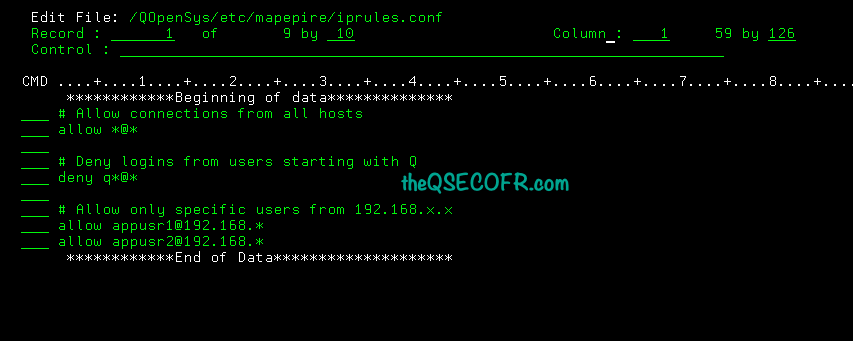
- Use /QOpenSys/etc/mapepire/iprules.conf file to control user access.

- Example: disable logins from user profiles starting with
Q- # Allow connections from all hosts
- allow *@*
- # Deny logins from users starting with the letter Q
- deny q*@*
- # Allow connections from all hosts
- Example: only allow specific users from a specific IP range
- # Deny by default
- deny *@*
- # Allow only appusr1 and appusr2, and only from 192.168.*.*
- allow appusr1@192.168.*
- allow appusr2@192.168.*
- # Deny by default
Example:
- Requirement: Deny Access all the users except user SAMEERA and SATSECOFR.
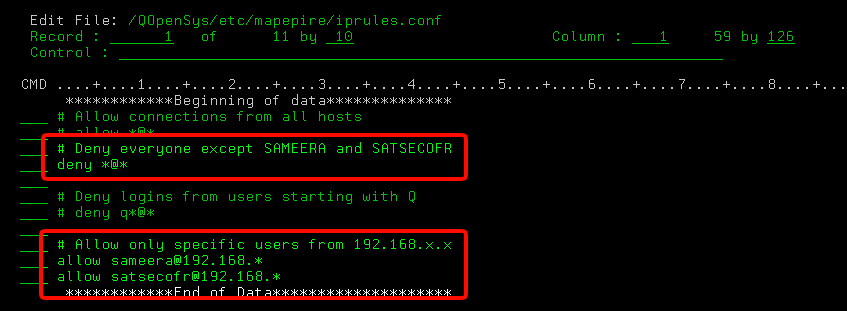
Expected Outcome:
- Users SAMEERA and SATSECOFR should be able to access but not others.
Result:
- User SAMEERA is in mapepire.ini file with correct password.
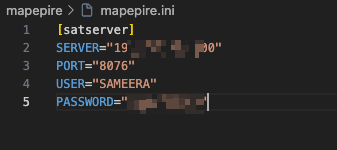
- Python Query output: Retrive expected output
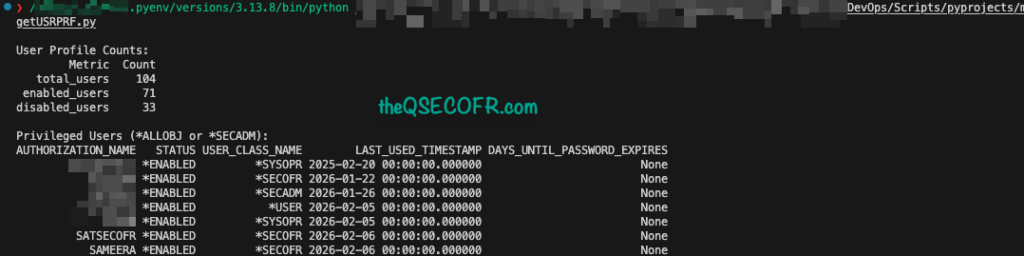
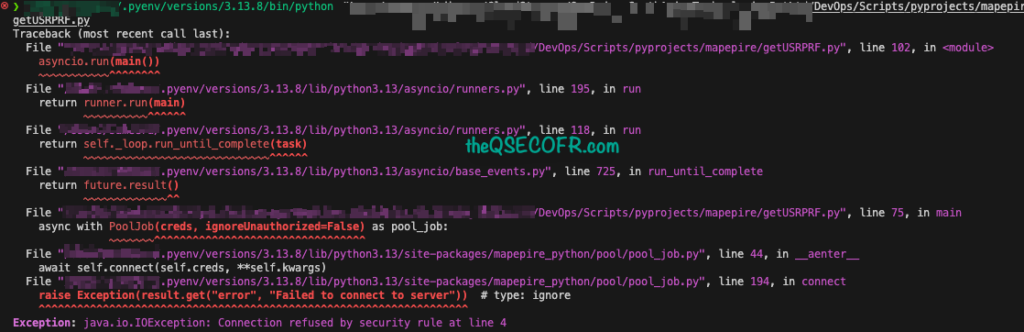
- User QSECOFR is in mapepire.ini file with correct password.
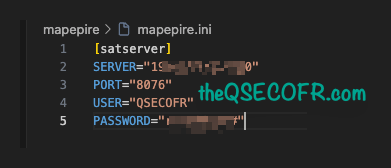
- Can not SQL into IBM i and get the expected output.
- The Error message is not end user friendly but requirement is serving as expected.
Python Samples
Here two of my basic python sample codes.
Sample 1: Get first 5 rows from a database/file
import asyncio
import configparser
import os
import pandas as pd

from mapepire_python.data_types import DaemonServer
from mapepire_python.ssl import get_certificate
from mapepire_python.pool.pool_job import PoolJob
#from mapepire_python.client.sql_job import SQLJob

def load_ini(ini_path, section="satserver"):
    config = configparser.ConfigParser()
    config.read(ini_path)
    return {
        "host": config[section]["SERVER"].strip('"'),
        "port": int(config[section]["PORT"].strip('"')),
        "user": config[section]["USER"].strip('"'),
        "password": config[section]["PASSWORD"].strip('"')
    }

async def main():
    base_dir = os.path.dirname(os.path.abspath(__file__))
    ini_path = os.path.join(base_dir, "mapepire.ini")

    conn_dict = load_ini(ini_path)

    # Create TLS credentials
    creds = DaemonServer(
        host=conn_dict["host"],
        port=conn_dict["port"],
        user=conn_dict["user"],
        password=conn_dict["password"]
    )

    # Connect with TLS (certificate verification enabled)
    async with PoolJob(creds, ignoreUnauthorized=False) as pool_job:
        res = await pool_job.query_and_run(
            "SELECT * FROM SATDTALIB.CUSTOMERS FETCH FIRST 5 ROWS ONLY",
            rows_to_fetch=5
        )

    # Convert 'data' key to Pandas DataFrame
    df = pd.DataFrame(res['data'])

    # Optional: reorder columns based on metadata
    column_order = [col['name'] for col in res['metadata']['columns']]
    df = df[column_order]

    # Display table nicely
    print(df.to_string(index=False))

if __name__ == "__main__":
    asyncio.run(main())
Output

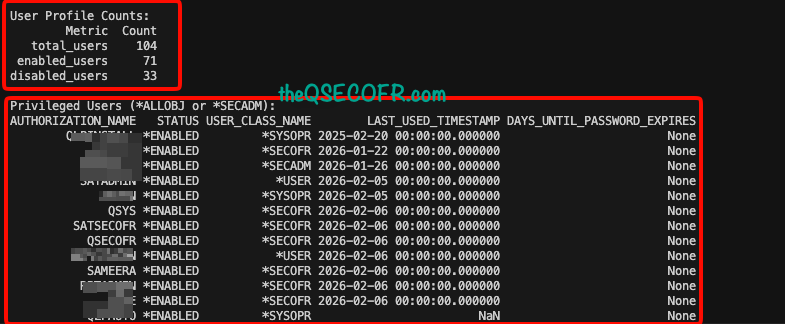
Sample 2: Total User Profile Count, Enabled and Disabled User Profile Count, and Users who have *ALLOBJ and *SECADM.
import asyncio
import configparser
import os
import pandas as pd

from mapepire_python.data_types import DaemonServer
from mapepire_python.ssl import get_certificate
from mapepire_python.pool.pool_job import PoolJob

# -----------------------------
# Load INI connection details
# -----------------------------
def load_ini(ini_path, section="satserver"):
    config = configparser.ConfigParser()
    config.read(ini_path)
    return {
        "host": config[section]["SERVER"].strip('"'),
        "port": int(config[section]["PORT"].strip('"')),
        "user": config[section]["USER"].strip('"'),
        "password": config[section]["PASSWORD"].strip('"')
    }

# -----------------------------
# Async function to query IBM i
# -----------------------------
async def fetch_user_stats(pool_job):
    queries = {
        "total_users": "SELECT COUNT(*) AS total_users FROM QSYS2.USER_INFO",
        "enabled_users": "SELECT COUNT(*) AS enabled_users FROM QSYS2.USER_INFO WHERE STATUS='*ENABLED'",
        "disabled_users": "SELECT COUNT(*) AS disabled_users FROM QSYS2.USER_INFO WHERE STATUS='*DISABLED'",
        "privileged_users": """
            SELECT
                AUTHORIZATION_NAME,
                STATUS,
                USER_CLASS_NAME,
                LAST_USED_TIMESTAMP,
                DAYS_UNTIL_PASSWORD_EXPIRES
            FROM QSYS2.USER_INFO
            WHERE STATUS = '*ENABLED'
              AND (SPECIAL_AUTHORITIES LIKE '%*ALLOBJ%' OR SPECIAL_AUTHORITIES LIKE '%*SECADM%')
            ORDER BY LAST_USED_TIMESTAMP ASC
        """
    }

    results = {}
    for key, sql in queries.items():
        try:
            res = await pool_job.query_and_run(sql)
            # Flatten single-value results
            if key != "privileged_users":
                results[key] = res['data'][0]
            else:
                results[key] = res['data']
        except Exception as e:
            print(f"Query {key} failed:", e)
            results[key] = None
    return results

# -----------------------------
# Main async function
# -----------------------------
async def main():
    base_dir = os.path.dirname(os.path.abspath(__file__))
    ini_path = os.path.join(base_dir, "mapepire.ini")
    conn_dict = load_ini(ini_path)

    creds = DaemonServer(
        host=conn_dict["host"],
        port=conn_dict["port"],
        user=conn_dict["user"],
        password=conn_dict["password"]
    )

    # Connect and fetch stats
    async with PoolJob(creds, ignoreUnauthorized=False) as pool_job:
        stats = await fetch_user_stats(pool_job)

        # -----------------------------
        # Single-value metrics
        # -----------------------------
        single_stats = {k: v[list(v.keys())[0]] for k, v in stats.items() if k != "privileged_users" and v is not None}
        df_stats = pd.DataFrame(single_stats.items(), columns=["Metric", "Count"])
        print("\nUser Profile Counts:")
        print(df_stats.to_string(index=False))

        # -----------------------------
        # Privileged users table
        # -----------------------------
        if stats["privileged_users"]:
            df_privileged = pd.DataFrame(stats["privileged_users"])
            columns_order = ["AUTHORIZATION_NAME", "STATUS", "USER_CLASS_NAME", "LAST_USED_TIMESTAMP", "DAYS_UNTIL_PASSWORD_EXPIRES"]
            df_privileged = df_privileged[columns_order]
            print("\nPrivileged Users (*ALLOBJ or *SECADM):")
            print(df_privileged.to_string(index=False))
        else:
            print("\nNo privileged users found.")

# -----------------------------
# Run async main
# -----------------------------
if __name__ == "__main__":
    asyncio.run(main())
Output
Is this fully secured?
Mapepire is a promising modern tool for IBM i SQL access over websockets, but like any technology, it comes with drawbacks and limitations that you need to consider, especially for app integration, security, and enterprise use.
- Default TLS behavior: Mapepire supports TLS, but certificate verification can be disabled with
ignoreUnauthorized=True. If misconfigured, this exposes your IBM i server to man-in-the-middle attacks. - Authentication: Mapepire relies on IBM i user credentials passed from the client. If credentials are hardcoded or shared, this can create a high-risk attack vector.
- No native RBAC: Mapepire itself doesn’t enforce fine-grained user roles. Security is mostly inherited from IBM i profile permissions. Applications using Mapepire must implement their own access control for API users.
- Auditability: While Mapepire logs activity, it may not fully integrate with enterprise audit/security tools unless extra steps are taken.
- Mapepire executes queries as the IBM i user you connect with. This means:
- If your app uses a “service account,” all queries have the same privileges, potentially giving broad access accidentally.
- Limiting access per table, column, or function requires careful user profile setup on IBM i, not in Mapepire.
- Special authorities: Queries that need
*ALLOBJ,*SECADM, or other high privileges can be dangerous if exposed via apps. - There’s no built-in multi-tenant user isolation; the client is fully trusted once connected.
Final Thoughts
Mapepire offers a modern, efficient, and secure approach to accessing Db2 for i. By simplifying client development and enhancing compatibility with cloud-native environments, it stands as a compelling alternative to traditional ODBC and JDBC drivers. For developers seeking a streamlined and flexible solution, Mapepire is worth exploring.