IBM i, formerly known as OS/400 and i5/OS, is a robust operating system developed by IBM for its Power Systems servers. Released in 1988, it emphasizes integration, security, and reliability, making it a staple in enterprise environments for business-critical applications. The “i” in IBM i stands for “integrated,” reflecting its design philosophy where components like the database, file systems, and security are seamlessly woven into the OS fabric. This article delves into key architectural elements of IBM i, including its object-based system, single-level storage, relational database integration, libraries and library lists, source files and types, the Integrated File System (IFS), and the Portable Application Solutions Environment (PASE).
Table of Contents
Object-Based System
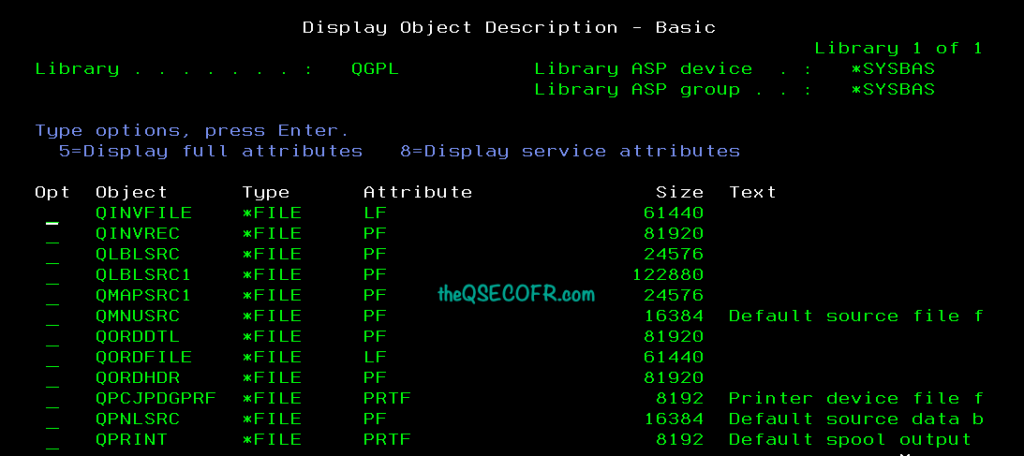
At the core of IBM i is its object-based architecture, where virtually everything on the system—from programs and files to data areas and queues—is treated as an object. An object in IBM i is a named, self-contained unit of storage that encapsulates data and the operations permissible on it. Each object has a specific type that defines its purpose and the actions that can be performed on it. For example, a program object (*PGM) can be executed but not directly edited, while a file object (*FILE) can store data and support read/write operations.
This object-oriented approach provides strong encapsulation and security. The operating system enforces type safety, preventing unauthorized or incompatible operations. Objects are identified by their name and type, and they must reside within a library (itself an object of type *LIB). The system manages objects uniformly, abstracting underlying hardware details.
When it comes to files, IBM i treats them as specialized objects rather than simple byte streams, as in many other operating systems. Files are *FILE objects with subtypes like physical files (PF) for actual data storage or logical files (LF) for views over physical data. This treatment allows for integrated management: files inherit object attributes such as ownership, authority, and auditing. For instance, a file’s attributes might include record length, key fields, and access paths, ensuring consistency and enabling features like automatic journaling for data integrity.
Single-Level Storage
One of IBM i’s hallmark features is single-level storage (SLS), a memory management technique that unifies main memory (RAM) and auxiliary storage (disk) into a single, vast virtual address space. In SLS, the entire system storage is addressed as a flat, two-dimensional plane of virtual addresses, where each address points to a page or object. This abstraction eliminates the traditional distinction between memory and disk; the operating system automatically handles paging data between RAM and disk as needed, without application involvement.
SLS originated from the System/38 architecture and is implemented in the System Licensed Internal Code (SLIC), a low-level firmware layer. It provides “unlimited” storage capacity (limited only by hardware), with objects persisting across system restarts. Benefits include simplified programming—no need for developers to manage file I/O or memory allocation explicitly—and enhanced performance through optimized caching and prefetching. For example, when an application accesses data, the system transparently loads the required pages into memory, treating disk as an extension of RAM. This model also supports teraspaces—large, private address spaces up to 1 TiB per process—for handling big data workloads.
Relational Database Integration
The integration of a relational database is a defining aspect of IBM i, embodied in Db2 for i (formerly DB2/400). As mentioned, the “i” signifies this deep integration: the database is not a separate add-on but an intrinsic part of the OS, embedded in the SLIC layer for optimal performance and security.
Db2 for i is a full-featured relational database management system (RDBMS) that supports SQL standards, including DDL, DML, and advanced features like stored procedures, triggers, and XML/JSON handling. It evolved from the non-relational database in System/38 but now fully embraces relational principles, with tables (physical files), views (logical files), and indexes. Data is stored in objects within libraries, accessible via native IBM i commands or SQL interfaces.
How the database works in IBM i is unique due to its integration. Applications can interact with data using record-level access (e.g., via RPG or COBOL) or SQL, with the OS handling concurrency, locking (row-level), and journaling for ACID compliance. Journaling logs changes for recovery and replication. The database leverages single-level storage for efficient I/O, supporting high transaction volumes—over 1 million per minute on high-end systems. Security is object-based, with granular authorities controlling access. This setup allows seamless interoperability with other OS components, such as integrating database queries with CL commands or web services.
Libraries and Library List
In IBM i, a library is an object (*LIB) that serves as a container for other objects, functioning like a directory but with enhanced management features. Libraries organize the system logically, holding programs, files, commands, and more. Rather than storing objects directly, a library maintains a catalog of pointers to their actual storage locations in single-level storage. This allows efficient searching and prevents object duplication unless explicitly copied.
A library list is a sequenced collection of libraries that the system uses to resolve object references during job execution. If an object is referenced without a qualified library name (e.g., CALL MYPGM instead of CALL MYLIB/MYPGM), the system searches the library list in order until it finds a match. This promotes modularity, as developers can override objects by placing custom versions higher in the list.
There are several types of library lists:
- System Library List (*SYS): Includes core system libraries like QSYS and QHLPSYS, searched first for system objects.
- Product Library List (*PRD): Associated with IBM products, added dynamically when using related commands.
- Current Library (*CURLIB): A single library designated as the default for the job; defaults to QGPL if unspecified.
- User Library List (*USR): Custom libraries added by users for application-specific objects.
- Job Library List (*LIBL): The combined list for a job, encompassing system, product, current, and user portions; viewable with DSPLIBL.
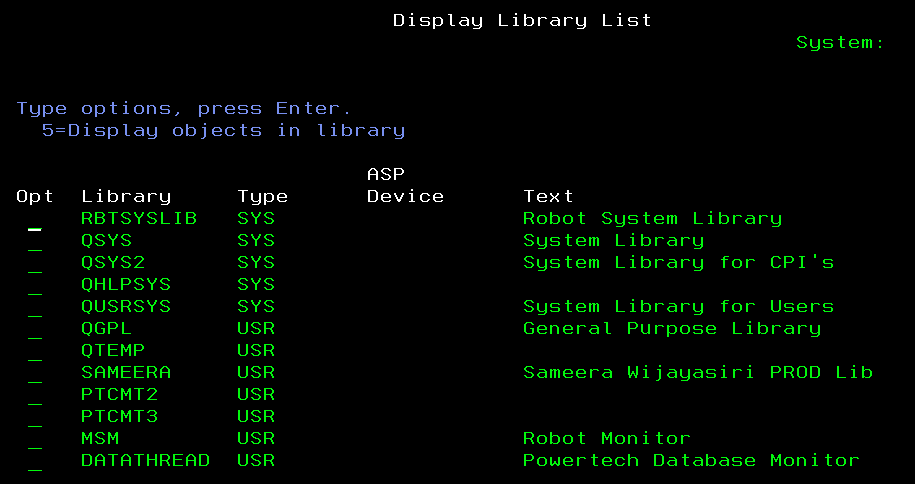
Other special lists include *ALL (all libraries), *ALLUSR (all user libraries), and *USRLIBL (user portion only).
Source Files and Types
Source files in IBM i are specialized physical files (PF-SRC) designed to store source code for programs, commands, or database definitions. They are organized into members, each representing a unit of code (e.g., an RPG program source). Common source types include RPG, COBOL, CL (Control Language), DDS (Data Description Specifications) for file definitions, and SQL scripts.
Files in IBM i come in various types, primarily:
- Physical Files (PF): Store actual data in fixed-length records, like a table in a database. Attributes include record format, key fields, and maximum members. Created with CRTPF.
- Logical Files (LF): Provide views or indexes over one or more physical files without duplicating data. They support sorting, selection, and joining. Attributes might specify key sequences or omit clauses.
- Source Physical Files (PF-SRC): A subtype of PF for source code, with default record length of 92 characters (including sequence and date fields).
- Device Files: Such as display files (*DSPF) for screens or printer files (*PRTF) for reports, defining layouts and attributes like field positions and fonts.
- Other Types: Save files (SAVF) for backups, data queues (DTAQ) for inter-process communication, and output queues (OUTQ) for spooled output.
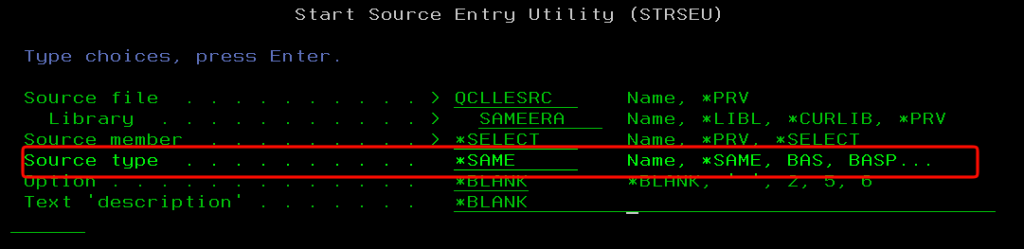
Attributes for files include object description, authority, size, creation date, and specific traits like reusable deleted records or journaling status. Tools like DSPFD (Display File Description) reveal these details.
Integrated File System
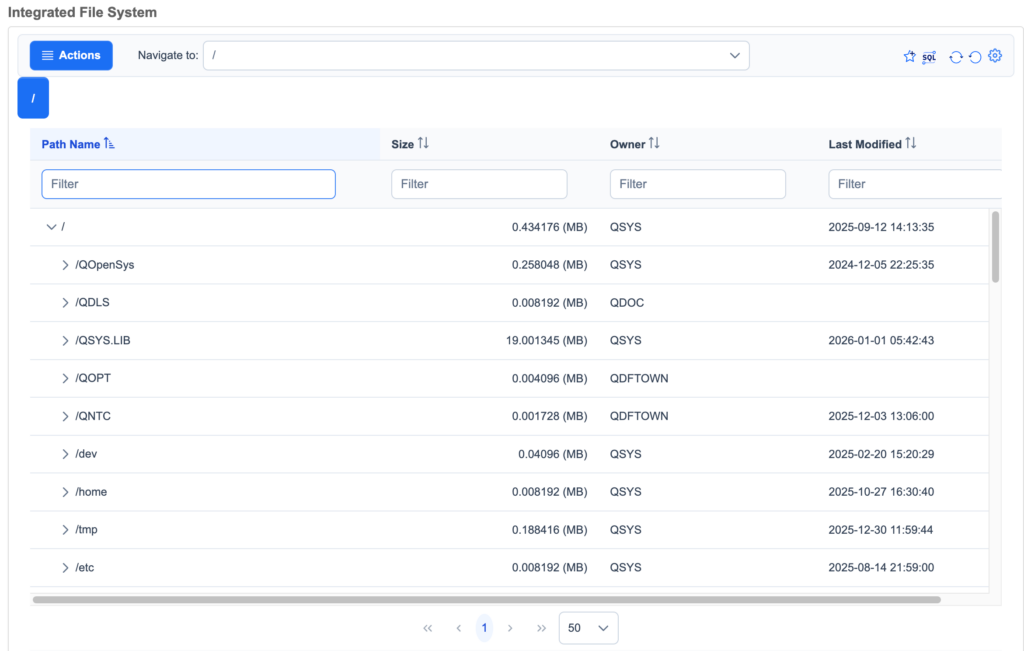
The Integrated File System (IFS) is a hierarchical file system in IBM i that unifies access to various storage structures, resembling Unix file systems in structure and commands. It uses directories (folders), symbolic links, path names, and stream files (byte-oriented, unlike record-based database files). This Unix-like interface supports case sensitivity in some file systems (e.g., QOpenSys) and commands like cd, ls, and cp via the QShell environment.
The purpose of IFS is to provide a flexible, standards-compliant way to manage files beyond the traditional library-based model. It enables integration with other platforms, supports web serving, Java applications, and storage of unstructured data like images or PDFs. IFS bridges native IBM i objects with stream-based access, allowing database files to be viewed as part of the hierarchy.
The IBM i IFS hierarchy starts at the root directory (/), with several file systems mounted:
- Root (/): The primary file system, case-insensitive, supporting long file names and links.
- QOpenSys: Case-sensitive, POSIX-compliant, ideal for Unix ports.
- QSYS.LIB: Maps to the library system, where libraries appear as directories and objects as files (e.g., /QSYS.LIB/MYLIB.LIB/MYFILE.FILE).
- QDLS: For document library services, compatible with older OS/2 formats.
- QOPT: For optical storage.
- QNTC: For Windows network shares.
- QFileSvr.400: For remote IBM i file systems.
This structure allows seamless navigation, with tools like WRKLNK for browsing.
PASE (Portable Application Solutions Environment)
PASE is an optional runtime environment in IBM i that provides binary compatibility for AIX (Unix-like) applications, allowing them to run without recompilation. It emulates AIX user-mode interfaces (32-bit and 64-bit) on top of IBM i’s SLIC, leveraging the PowerPC architecture shared between AIX and IBM i.
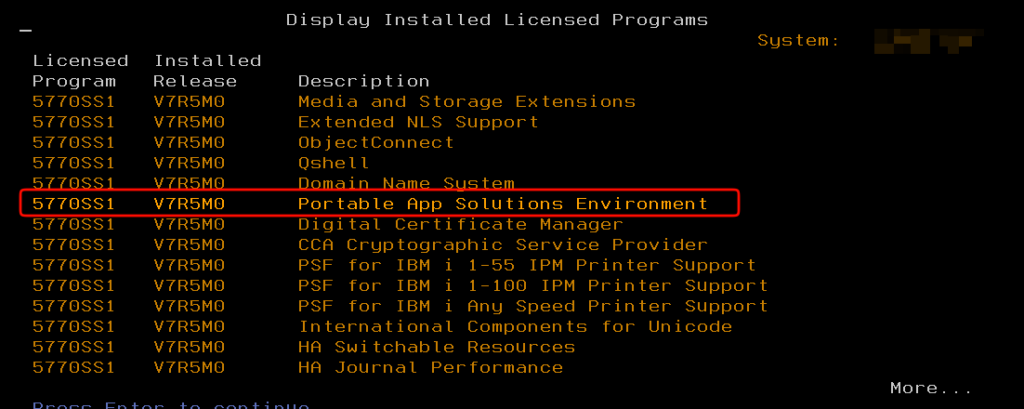
PASE is needed to extend IBM i’s capabilities with open-source and Unix software, bridging the gap between IBM i’s proprietary model and standard Unix tools. Without it, porting applications would require source code recompilation under IBM i’s native compilers, which isn’t always feasible.
With PASE, users can:
- Run AIX executables directly, accessing IBM i resources like Db2 for i databases via ODBC or native calls.
- Install and manage open-source packages using RPM and YUM, such as Apache, Python, or Node.js.
- Develop hybrid applications that combine PASE processes with native IBM i programs (e.g., RPG calling a Perl script).
- Utilize teraspaces for large memory allocations in PASE processes.
- Support interoperability, like running shells (ksh, bash) or tools for system administration.
PASE enhances IBM i’s versatility, making it suitable for modern workloads while preserving its integrated strengths.
Methods to Access PASE
- Interactive 5250 Session (Most Common)
- Log in to your IBM i system via a 5250 emulator (like IBM i Access Client Solutions).
- On the command line, type:
CALL QP2TERM. - Press Enter to get a PASE shell prompt (e.g.,
/QOpenSys/home/user>).
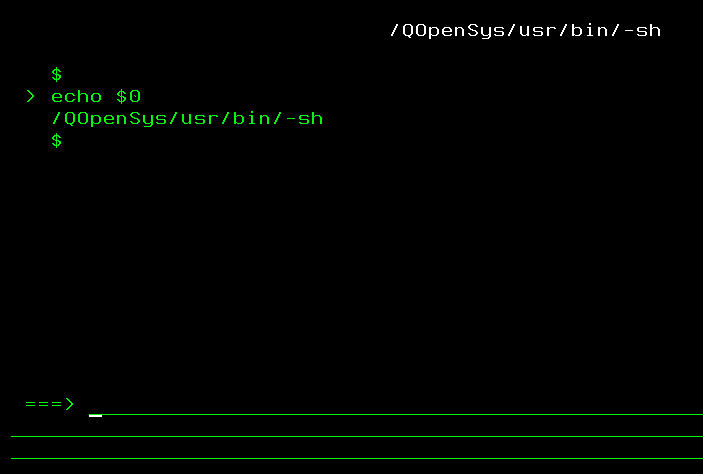
CALL QP2TERM- Using SSH
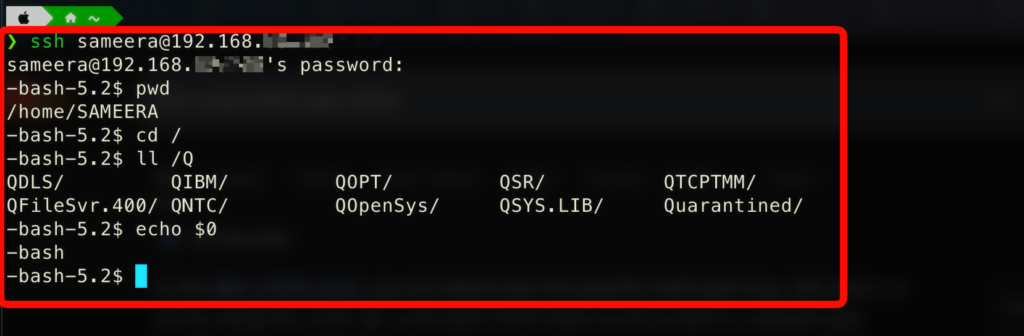
- Ensure the SSH server is running on your IBM i (
STRTCPSVR *SSHD). - Use an SSH client (PuTTY, VSCode terminal, etc.) from your PC.
- Connect to your IBM i IP address:
ssh username@your_ibm_i_ip. - You’ll get a PASE shell directly.
- Ensure the SSH server is running on your IBM i (
- IBM Documentation: IBM i Concepts – Objects https://www.ibm.com/docs/en/i/7.4?topic=concepts-i-objects
- Wikipedia: IBM i (detailed history and architecture layers) https://en.wikipedia.org/wiki/IBM_i
- LANSA: What is IBM i? A Comprehensive Overview https://lansa.com/blog/application-modernization/ibm-i-modernization/what-is-ibm-i/
- IBM Documentation: i Objects https://www.ibm.com/docs/en/i/7.4?topic=concepts-i-objects
- Wikipedia: Object (IBM i) https://en.wikipedia.org/wiki/Object_(IBM_i)
- Wikipedia: IBM i (object model section) https://en.wikipedia.org/wiki/IBM_i
- Wikipedia: Single-level store https://en.wikipedia.org/wiki/Single-level_store
- Source Data: What Is IBM i Single Level Storage? And Why Should I Care? https://source-data.com/2020/04/27/what-is-ibm-i-iseries-as400-single-level-storage-and-why-should-i-care/
- Integrative Systems: Why Should you Care About IBMi Single Level Storage? https://www.integrativesystems.com/ibmi-single-level-storage/
- IBM: Db2 for IBM i Overview https://www.ibm.com/support/pages/db2-ibm-i
- IBM Documentation: Db2 for i https://www.ibm.com/docs/en/i/7.4?topic=overview-db2-i
- Wikipedia: IBM i (“i” stands for integrated) https://en.wikipedia.org/wiki/IBM_i
- IBM Documentation: Libraries and Library Lists https://www.ibm.com/docs/en/i/7.1?topic=libraries-library-lists (applicable to later versions)
- Nick Litten: IBM i Libraries and Objects https://www.nicklitten.com/course/ibm-i-libraries-and-objects/
- Programmers.io: Libraries and Library List https://programmers.io/ibmi-ebooks/libraries-and-library-list/
- IBM Documentation: Physical Files and Logical Files https://www.ibm.com/docs/en/i/7.4?topic=program-physical-files-logical-files
- Nick Litten: Difference between Physical and Logical Files https://www.nicklitten.com/course/what-is-the-difference-between-physical-and-logical-files/
- Programmers.io: Physical and Logical Files https://programmers.io/ibmi-ebooks/physical-and-logical-files/
- IBM Documentation: The Integrated File System https://www.ibm.com/docs/en/i/7.4?topic=system-integrated-file-ifs
- IBM Documentation: Integrated File System https://www.ibm.com/docs/en/i/7.4?topic=systems-integrated-file-system
- AS400 and SQL Tricks: Introduction to IFS on IBM i https://www.as400andsqltricks.com/2022/04/IntroductiontoIFSonIBMiAS400.html
- PASE (Portable Application Solutions Environment)
- IBM Documentation: IBM PASE for i https://www.ibm.com/docs/en/i/7.4?topic=programming-pase-i
- IBM Support: Ordering Portable Application Solution Environment (PASE) https://www.ibm.com/support/pages/ordering-portable-application-solution-environment-pase
- Wikipedia: IBM i (PASE section) https://en.wikipedia.org/wiki/IBM_i